Project Case Study

Home Router Security Assessment – Local Port Scan & Configuration Review

I performed a basic security assessment of an old ISP-provided consumer router in an isolated home-lab environment. The goal was to identify exposed local services, confirm the router's management surfaces, document the scan process, and review settings that affect the router's security posture.

Objective

Assess an old consumer router that I own and no longer use with my current service provider. I wanted to practise safe network reconnaissance, identify exposed services on the local gateway, and document the results in a professional format suitable for my cybersecurity portfolio.

Lab setup

The assessment was performed from my MacBook while connected to the old router's local network. I did not use my Proxmox Kali VM for this version because disconnecting the Proxmox server from my main network would interrupt access to the Proxmox web interface. For this first scan, the laptop and router were enough.

Testing machine:  MacBook

Tooling:          Terminal, Nmap 7.99, web browser

Target device:   Old ISP-provided DOCSIS gateway/router

Router IP:       10.0.0.1

Laptop IP:       10.0.0.239

Interface:       en0

Network:         10.0.0.0/24

Tools used

  • Nmap 7.99 for TCP service discovery and service/version detection.
  • macOS Terminal for interface, routing, and connectivity checks.
  • Browser-based router administration page for local management review.
  • Screenshots and notes for portfolio documentation.

Methodology

  • Confirmed that Nmap was installed and available from the terminal.
  • Identified the default gateway using route -n get default.
  • Confirmed the laptop's local IP address and active interface using ifconfig.
  • Verified network connectivity to the router using ICMP ping.
  • Ran a basic Nmap scan against the gateway at 10.0.0.1.
  • Ran targeted service detection against common router and management ports.
  • Documented open and filtered ports, then prepared the results for a findings table.

Initial results

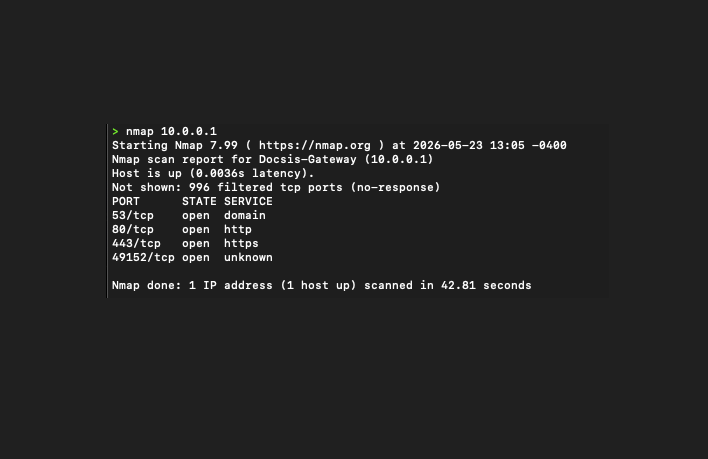
The first scan confirmed that the router was reachable and exposing a small number of local services. Most TCP ports were filtered, which is a positive sign because unnecessary services were not openly responding to the local client.

nmap 10.0.0.1

53/tcp    open  domain

80/tcp    open  http

443/tcp   open  https

49152/tcp open  unknown

996 filtered tcp ports

Service detection

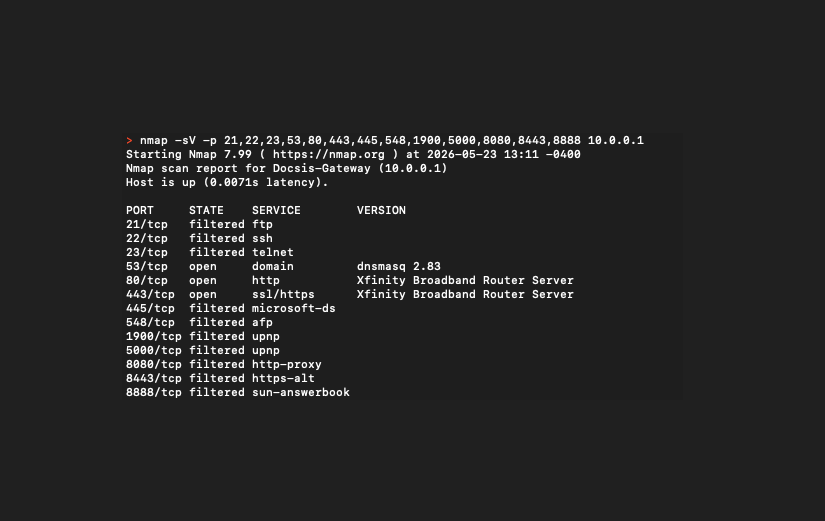
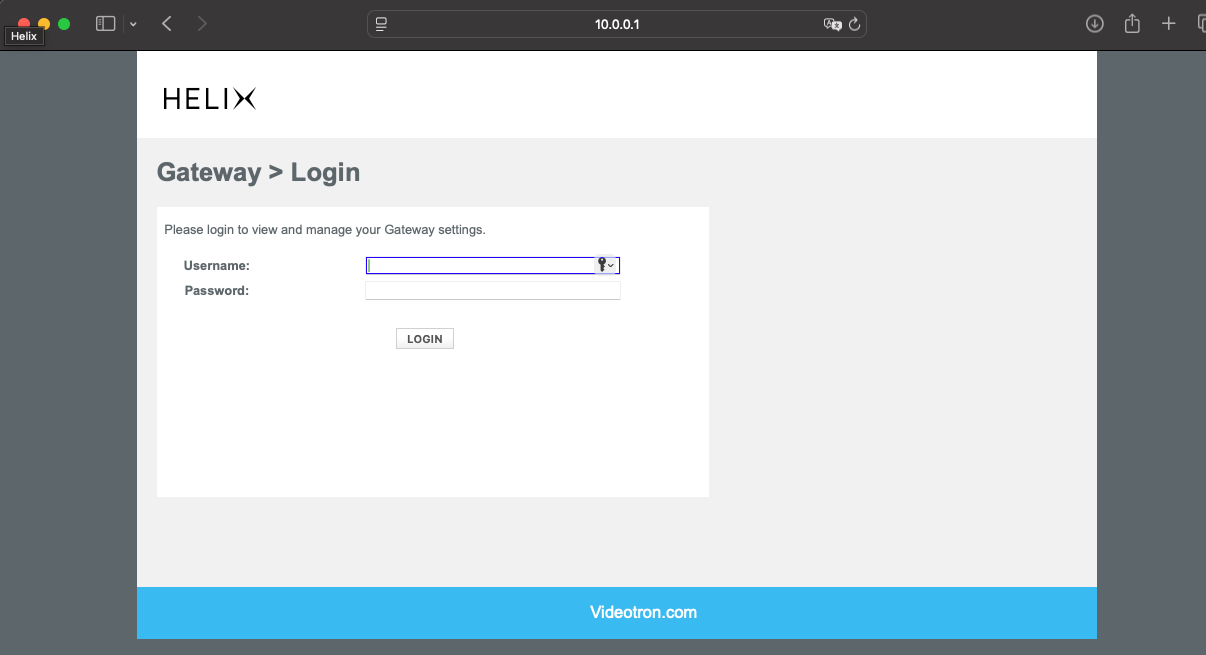
A targeted service scan identified DNS on port 53 and a router administration service on ports 80 and 443. Nmap reported the web service banner as Xfinity Broadband Router Server, while the browser login page displayed the Helix/Videotron gateway interface. Several commonly risky services, including FTP, SSH, Telnet, SMB, AFP, and alternate web administration ports, appeared filtered during the targeted scan.

nmap -sV -p 21,22,23,53,80,443,445,548,1900,5000,8080,8443,8888 10.0.0.1

53/tcp   open      domain     dnsmasq 2.83

80/tcp   open      http       Xfinity Broadband Router Server

443/tcp  open      ssl/https  Xfinity Broadband Router Server

21/tcp   filtered  ftp

22/tcp   filtered  ssh

23/tcp   filtered  telnet

445/tcp  filtered  microsoft-ds

548/tcp  filtered  afp

1900/tcp filtered  upnp

5000/tcp filtered  upnp

8080/tcp filtered  http-proxy

8443/tcp filtered  https-alt

8888/tcp filtered  sun-answerbook
Assessment Results

Findings and interpretation

The router exposed expected gateway services on the local network: DNS and web-based administration. The scan also found an unknown high TCP port, which should be followed up with targeted service detection before drawing conclusions. Filtered results on Telnet, FTP, SSH, SMB, and alternate admin ports were documented as positive observations.

Finding 1

DNS service exposed locally

Evidence: 53/tcp open domain dnsmasq 2.83

Risk / meaning: This is expected for a router, but the DNS service should remain limited to the local network.

Recommendation: Keep DNS service internal and avoid exposing router services to the WAN.

Finding 2

HTTP management surface exposed

Evidence: 80/tcp open http

Risk / meaning: Local users can reach the router login surface over HTTP.

Recommendation: Use a strong admin password and prefer HTTPS administration where supported.

Finding 3

HTTPS management surface exposed

Evidence: 443/tcp open ssl/https

Risk / meaning: Secure local web administration is available.

Recommendation: Use HTTPS for management and disable remote administration if available.

Finding 4

Unknown high port open

Evidence: 49152/tcp open unknown

Risk / meaning: This requires follow-up enumeration before deciding whether it is expected or unnecessary.

Recommendation: Run targeted service detection against port 49152 and document the result.

Positive observation

Risky services filtered

Evidence: FTP, SSH, Telnet, SMB, AFP, UPnP-related TCP ports, and alternate admin ports were filtered.

Risk / meaning: Unnecessary services were not openly exposed to the local client during testing.

Recommendation: Keep unused services disabled and review UPnP, WPS, and remote management settings.

Challenge

Tooling decision

I originally planned to use my Kali VM inside Proxmox, but realized that disconnecting the Proxmox server from my main network would prevent me from reaching the Proxmox web UI from my laptop. I adjusted the plan and used Nmap directly from macOS instead.

Troubleshooting

Command syntax

A failed command, nmap -sv, helped confirm that Nmap options are case-sensitive. The correct command is nmap -sV.

Clarification

Ping behavior

I learned that ping -p 53 on macOS does not test port 53. It changes the ICMP payload pattern, while Nmap was the correct tool for identifying port 53 as an exposed DNS service.

Value

Why this project matters

This project demonstrates practical network reconnaissance, local gateway enumeration, command-line troubleshooting, and security documentation while keeping testing scoped to owned equipment in a controlled environment.

Scan Breakdown

Version 1 process

The assessment followed a simple workflow: identify the gateway, confirm connectivity, scan exposed services, interpret the results, and document next steps.

Step 1

Identify the gateway

Used route -n get default and ifconfig to identify the router as 10.0.0.1 and confirm the laptop's local address on the router network.

Step 2

Confirm connectivity

Sent ICMP echo requests to the gateway and confirmed 0.0% packet loss, showing that the router was reachable before scanning.

Step 3

Enumerate TCP services

Ran a basic Nmap scan and targeted service detection to identify DNS, HTTP, HTTPS, and one unknown high port exposed on the local gateway.

Step 4

Document findings

Converted raw scan output into structured findings with evidence, meaning, and recommended follow-up actions.

Command Log

Commands used during the assessment

These commands were run only against my own router on my local lab network.

Tool verification

Confirmed that Nmap was installed and available from the terminal.

nmap --version

Gateway discovery

Identified the default gateway used by the laptop while connected to the old router.

route -n get default

Interface review

Confirmed the active interface, local IP address, and subnet details.

ifconfig

Connectivity test

Verified that the router gateway responded before running service enumeration.

ping 10.0.0.1

Initial TCP scan

Scanned common TCP ports on the router gateway.

nmap 10.0.0.1

Service detection

Identified services and versions on selected router-relevant ports.

nmap -sV -p 21,22,23,53,80,443,445,548,1900,5000,8080,8443,8888 10.0.0.1

Evidence

Proof snapshots

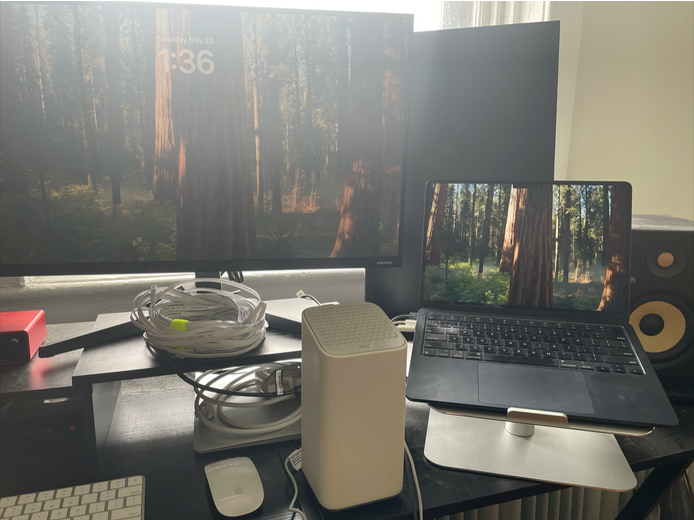
These screenshots show the physical lab setup, local router login page, initial Nmap scan, and targeted service detection scan. Sensitive values such as MAC addresses, passwords, serial numbers, QR codes, and public/WAN details should be redacted before publishing.

MacBook connected to an old router for an isolated router security assessment
Physical lab setup showing the laptop connected to the old router in a controlled local environment.
Router administration login page showing the local gateway address
Browser access to the local router gateway at 10.0.0.1, confirming the administration interface was reachable.
Nmap scan output showing open ports on the router gateway
Initial TCP scan identifying exposed local services on the router gateway.
Nmap service detection scan showing dnsmasq and router web administration services
Targeted service detection identifying DNS and local web administration services.

Next Stage

What comes next

Follow up on high port

Run nmap -sV -p 49152 10.0.0.1 to determine whether the exposed high port is expected router behaviour.

Review router settings

Check firmware version, WPS, UPnP, remote management, firewall settings, wireless encryption, and admin password status.

Harden and rescan

Apply safe hardening changes, then re-run the scan to compare the exposed service profile before and after remediation.